The 8 types of waste: DOWNTIME
Waste in Production
The #1 Expense
In film production the #1 Expense is artists. Take a look at publicly available data from
| Share of revenue | 2021 | 2020 | 2019 |
|---|---|---|---|
People | 65.1% | 88.8% | 73.0% |
| IT | 5.3% | 10.7% | 6.7% |
| Real estate | 2.7% | 5.5% | 3.6% |
Source: Technicolor Creative Studios Combined Financial Statements, issued 8 June 2022. MPC, The Mill, Mikros Animation and Mr. X. Euros, continuing operations.
The Invisible Cost
This entire website is about the invisible cost of “Technical Chores” in production and what we can learn from manufacturing in film making. We have an entire section of the site dedicated to displaying that invisible cost (like in this example of a model pipeline) where the only value producing part of this process is the pink “Art” column.
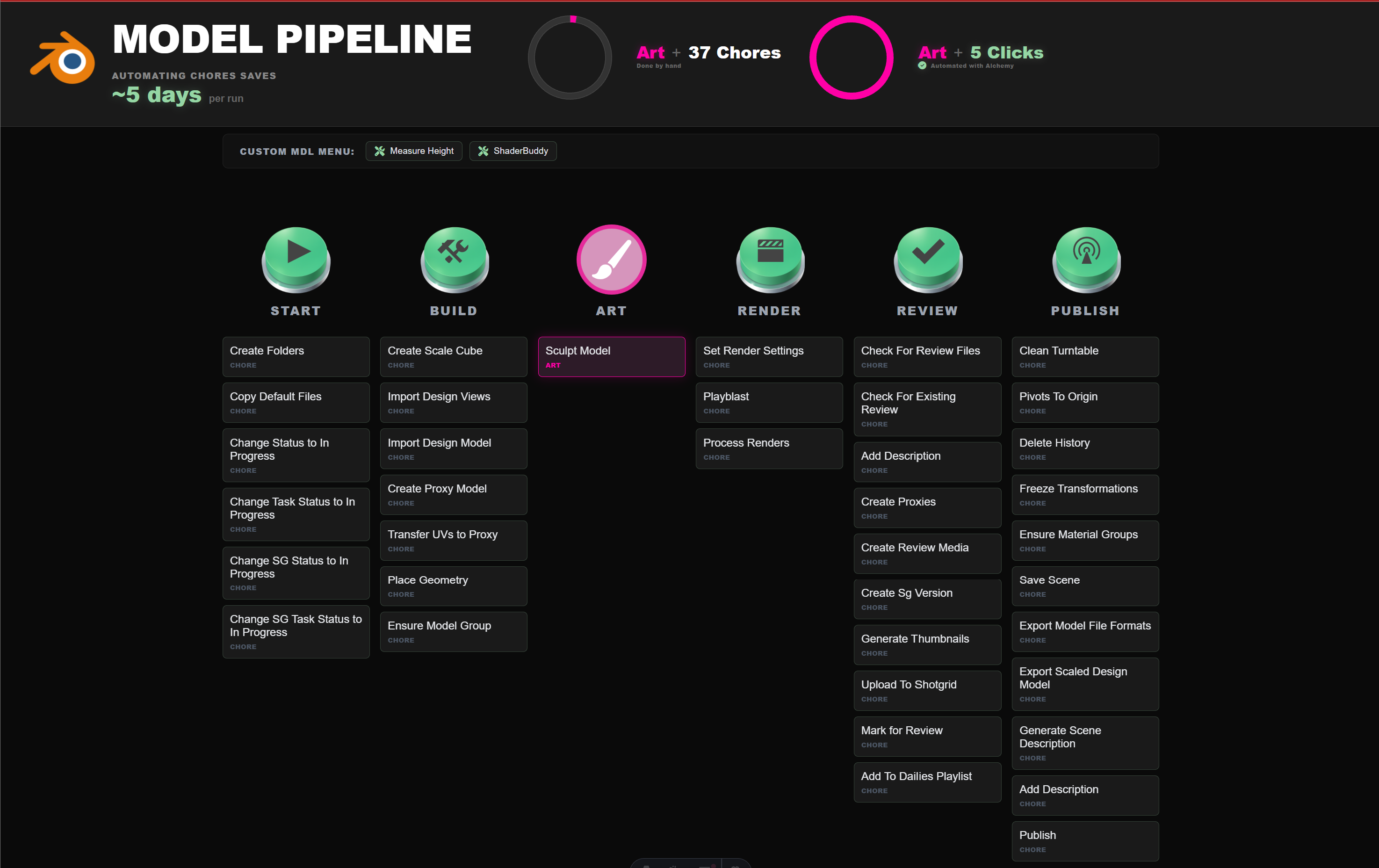
Everything else amounts to technical chores. But how do we break that down? The good thing is manufacturing solved that for us decades ago. Toyota was first, and that turned into “Lean” which gave us incredible acronyms like “DOWNTIME”.
DOWNTIME - the 8 types of waste
| Waste | What it is | |
|---|---|---|
| D | Defects | Work that fails to meet specification, requiring rework, scrap or correction. |
| O | Overproduction | Producing before the next step needs it, which leads to excess storage and hides problems. |
| W | Waiting | Idle time when people, equipment or materials sit waiting for the next step in a process. |
| N | Non-Utilized Talent | Failing to engage or leverage employee ideas, skills and creative problem-solving. |
| T | Transportation | Unnecessary movement of materials, tools or information from one place to another without adding value. |
| I | Inventory | Excess raw materials, work in progress or finished goods tying up capital and space. |
| M | Motion | Unnecessary movement by people or equipment, caused by poor layout. |
| E | Extra-Processing | More work, tighter tolerances or more complex steps than the customer actually requires. |
Waste at a Studio
D: Defects
Bugs from any department in the chain that weren’t seen inside the department, found downstream, needing a new iteration cycle to fix.
- A model is published at the wrong scale - but not discovered until problems in layout.
- A texture is published in the wrong color space.
- Design is published at the wrong resolution.
O: Overproduction
Models that never show up on screen, extra frames, file types nobody uses. Tests, code and products that aren’t needed or aren’t used.
- A lot of extra models are made for a city before previs has defined camera angles.
- A tool is created that doesn’t solve a production problem.
- Multiple meetings are had to solve a problem that didn’t need to be solved.
W: Waiting
Renders, processing, conversions, approvals, an upstream department, a computer to be ready, software to be installed, a license that hasn’t arrived.
- Waiting for processing:
- A modeler waits for a turntable render.
- A lighter waits for a render to be converted to a movie.
- A lighter waits 5 mins per shot to open lighting in Maya vs. 5 mins once to open an entire season of a show in Unreal.
- A new artist waits for software to be installed on their computer.
- A new artist waits for their computer to be built.
- An assignment is ready, but the artist waits for someone to hand it to them.
N: Non-Utilized Talent
Artists are the best sensors of waste a studio has. They’re in the work every day and they know where the time goes.
- Character artists flag that their process is too complex and it’s hurting their productivity.
- An fx artist flags that he could work faster with a Houdini license.
- A compositor flags that he could work faster with a Nuke license.
- A producer flags that she needs multiple lighting setups as easy defaults in unreal engine.
- An animator flags that getting renders out is buggy.
T: Transportation
Files and assets moved from one folder to another. Uploads, downloads, and so on.
- An artist copies their file to a shared location on disk.
- An artist uploads a file that already lives on a shared drive to another location so the database can track it.
- A producer prepares a delivery package to send to another studio.
- A producer ingests a delivery package from a studio.
I: Inventory
Anything the studio has paid for that is sitting still: finished work waiting on the next department, storage, licenses and hardware.
- 300 TB of renders from versions nobody will use again, sitting on the server.
- 30 software licenses and workstations bought in month one for a crew that ramps up in month four.
- Purchased asset libraries that are not being used.
M: Motion
Finding where work lives. Asking which folder, and asking again next week because the answer was a person rather than a system.
- An artist opens four folders to find the latest version of a rig.
- A new artist asks a lead where a character’s textures live, then asks again the next week.
- A compositor checks the tracker, email and chat to find the notes for a shot.
E: Extra-Processing
Manual steps a convention or a tool would remove. The same decision made again because it was never written down. Typing what the system already knows: tokens on a file to tell it where to save, a status re-keyed into a tracker.
- A coordinator updates statuses manually in a production tracker.
- Artists manually create file paths to match naming convention in a shared document.
- An artist clicks 15 times to reach a tool, when it could be automated to 1 click.
- A lead explains the naming convention again on every new show because it was never written down.
- A lead shows someone a workflow instead of the workflow being documented.
How to address waste
1. Name it
“The pipeline is slow” can’t be fixed. “Lighters wait five minutes per shot for Maya to open” is Waiting, and it can. Give every complaint one of the eight names.
2. Track it
Does your studio track complaints? Simply writing waste down is a big step. Keep it light, though. Production moves fast, and a month from now there’s a different problem. The patterns only show up over time. Writing it down is how a studio learns what an experienced person already knows.
3. Price it
Artists are the biggest line in the budget, so waste in their day is the most expensive waste a studio has. Price both sides: what the waste costs every month, and what the fix costs. Then ask how long the fix takes to pay for itself.
A license pays for itself in days or weeks. A full pipeline build can cost millions. Most studios know neither number. You need to know what doing it costs, and what not doing it costs. Not every idea is worth doing and price is typically the determinant.
4. Assign it
Make one person responsible for it, with the authority to do something about it. This sounds obvious, but it’s the step that gets skipped. Many studios don’t have this person on staff. Is it somethign that a freelancer could handle? No matter what to eliminate waste - it has to be someone’s job.
5. Eliminate it
Do the thing. Sometimes that’s as easy as buying the software. Sometimes it requires custom development. Sometimes it requires changing habbits. This is the stage where we execute.
Artists are the biggest expense a studio has, and most of their day goes to technical chores. DOWNTIME gives those chores names. Once they have names, you can track them, price them, give them to someone, and get rid of them. To see where the time goes on a real production, start with the pipeline map.